
Sound Engineer Training
From acoustic fundamentals to a finished mix: recording, mixing, mastering, film sound and editing, learned on Pro Tools online and practised in the studio.
What this course is
A complete route through professional audio: you learn what happens to sound physically, how equipment handles it, and how to make deliberate decisions with it. The theory is worked through online; the parts that need your hands and your ears in a room happen on the practical weekends.
The programme is split into six modules. Each one stands on its own, and together they follow the path a real production takes: understand the signal, capture it, shape it, place it against picture, tidy it, and deliver it.
How the two halves fit together
Today’s computers can do what once required a large studio, so editing, mixing and structural decisions are genuinely practicable at home. What is not practicable at home is hearing what a room does to a source, or judging what twenty centimetres of microphone position changes. That division is exactly where the line between the online and in-person phases is drawn.
You will submit exercises regularly and get feedback on them. That feedback — from people who do this work — is the part of the course that moves you fastest.
Who this course is for
- You want to work with sound professionally and need the theory as well as the practice.
- You already record or mix, but want to understand why your decisions work.
- You are studying or working and need a schedule that does not require moving city.
- You are comfortable working on a computer and are ready to practise regularly.
What you will be able to do
- Follow a signal from microphone to loudspeaker and find a fault in the chain.
- Set up and record a multi-microphone session with usable, phase-coherent results.
- Build a mix with deliberate decisions about level, balance, dynamics and space.
- Prepare and deliver material in the formats a client or broadcaster expects.
- Work on picture: record on location, edit dialogue and build a soundtrack.
- Judge where AI-assisted tools help and where professional judgement has to take over.
Curriculum
- Acoustic and audio fundamentals
- Ear training
- Analogue and digital principles
- Signal flow and studio systems
- Pro Tools foundations
Module 2 — Sound Recording
- Microphone types and polar patterns
- Recording systems and preamps
- Studio recording practice
- Multichannel workflows
- Live and concert recording
- Mixing principles and balance
- Dynamics and equalisation
- Plug-ins and outboard processing
- Effects and spatial treatment
- Mastering and critical listening
- Location recording
- Sound effects and Foley
- Sound design
- Post-production workflows
Module 5 — Sound Editing
- Editing workflows and session organisation
- Dialogue editing
- Delivery formats
- Practical projects
- Where AI-assisted tools sit in current workflows
- Restoration and noise reduction
- Transcription and source separation
- Responsible use and limitations
Professional practice
- Copyright basics and rights management
- Business models in the music industry
- Production and session management
- Self-management, time management and studio teamwork
Course modules
From acoustic fundamentals to a finished mix: recording, mixing, mastering, film sound and editing, learned on Pro Tools online and practised in the studio.
- Basic Concepts: DAWThe groundwork: how sound behaves, how to hear what is happening, and how a digital studio is put together.
- Sound RecordingCapturing sound well enough that the mix becomes a choice rather than a rescue operation.
- Mixing – MasteringTurning captured material into a finished balance, with decisions you can justify and repeat.
- Film SoundWorking to picture: capturing usable location sound and building a soundtrack that supports the image.
- Sound EditingThe unglamorous craft that decides whether a session can be finished, handed over, or reopened in a year.
- AI in Sound EngineeringA sober look at AI-assisted audio tools: what they do well today, what they do badly, and how to stay responsible for the result.
What the practical weekends cover
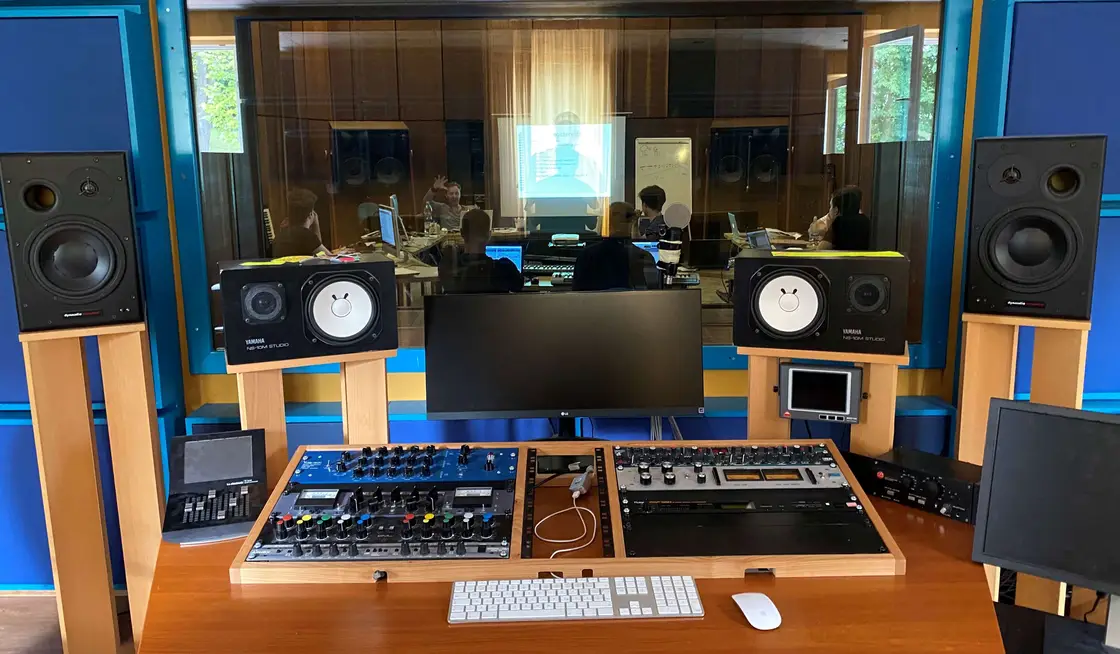
The in-person weekends run from Friday to Sunday in a studio. The topics build on each other: systems and signal flow first, then Pro Tools operation, recording, mixing, effects, mastering, film sound and live sound.
- Several exercises and assignments each month on the platform
- A webinar on the current topic
- Optional additional workshops on request
- Individual or small-group solutions, with teacher feedback on each
How the learning works
Learning platform
Your own access to structured material, exercises and a forum, available around the clock.
Pro Tools during the course
We provide the Pro Tools access needed for study, so you practise on the same surface the studios use.
Feedback on your work
Teachers review the exercises you submit and comment on them professionally, not just numerically.
Studio weekends
Practical work happens in small sub-groups so everyone gets hands on the equipment.
Entry requirements
Equipment and software
- Computer with an internet connection
- Audio interface
- Headphones
- A microphone for home exercises
Equipment and software
- Pro Tools (provided for the duration of the course)
Benefits
- 01
Study around your life
The online phase has no fixed class hours, so the course can be completed alongside work.
- 02
Real equipment
Patchbays, preamps, converters and reference monitoring — not only diagrams.
- 03
Maximum 12 participants
Practical exercises run in even smaller sub-groups, so there is time for everyone.
- 04
Professional contacts
You work with participants from other courses, and with teachers who are active in the industry.
Frequently asked questions
What does semi-virtual mean?
/ Learning concept
You get your own access to an online learning platform with teaching videos, written material, exercises and a forum, available around the clock. Your physical presence is needed only for the practical phases: three-day weekends spent working in a studio environment. Everything else can be done from home, flexibly.
Can a hands-on trade like sound engineering really be learned partly online?
/ Learning concept
Partly yes — and that is exactly why it is “partly”. Today’s computers can do what once needed a large studio, so editing, mixing and structural decisions can genuinely be practised at home, on the same software the studios use. What cannot be learned at home — how a room sounds, what microphone position changes, the phase questions in multi-microphone setups — is covered on the practical weekends in a studio.
What equipment will I need?
/ Equipment
For the sound engineer training: a computer, an audio interface, headphones and a microphone for home exercises. For media composition, additionally a MIDI keyboard, which is provided during the practical phases. For media photography, a camera with fully manual controls. We provide the Pro Tools access needed for study during the course.
Can I complete the course while working?
/ Working while studying
Yes — the concept was designed for it. The online phase has no fixed timetable, so you move through the material when you have time. The practical weekends are the only fixed points you have to set time aside for, and we announce them in advance. It does take steady work, though: anyone who only prepares for the weekends falls behind.
How to apply
From acoustic fundamentals to a finished mix: recording, mixing, mastering, film sound and editing, learned on Pro Tools online and practised in the studio.